


A website RFP (request for proposal) is the document you send to agencies when you want them to quote a new website or a redesign. A clear RFP gets you proposals you can compare side by side. A vague one gets you prices that are hard to compare, because each agency fills the gaps with its own assumptions.
This guide explains what to include in a website RFP, what to add for a redesign, and how to compare the proposals you get back. You will also find a website RFP template you can copy and an example of a filled-in RFP.
What is a website RFP?
A website RFP describes your organization, the website you need, your requirements, budget, and timeline, and asks vendors to respond with a proposal in a set format. Because every agency answers the same questions, you can compare potential vendors on the same terms.
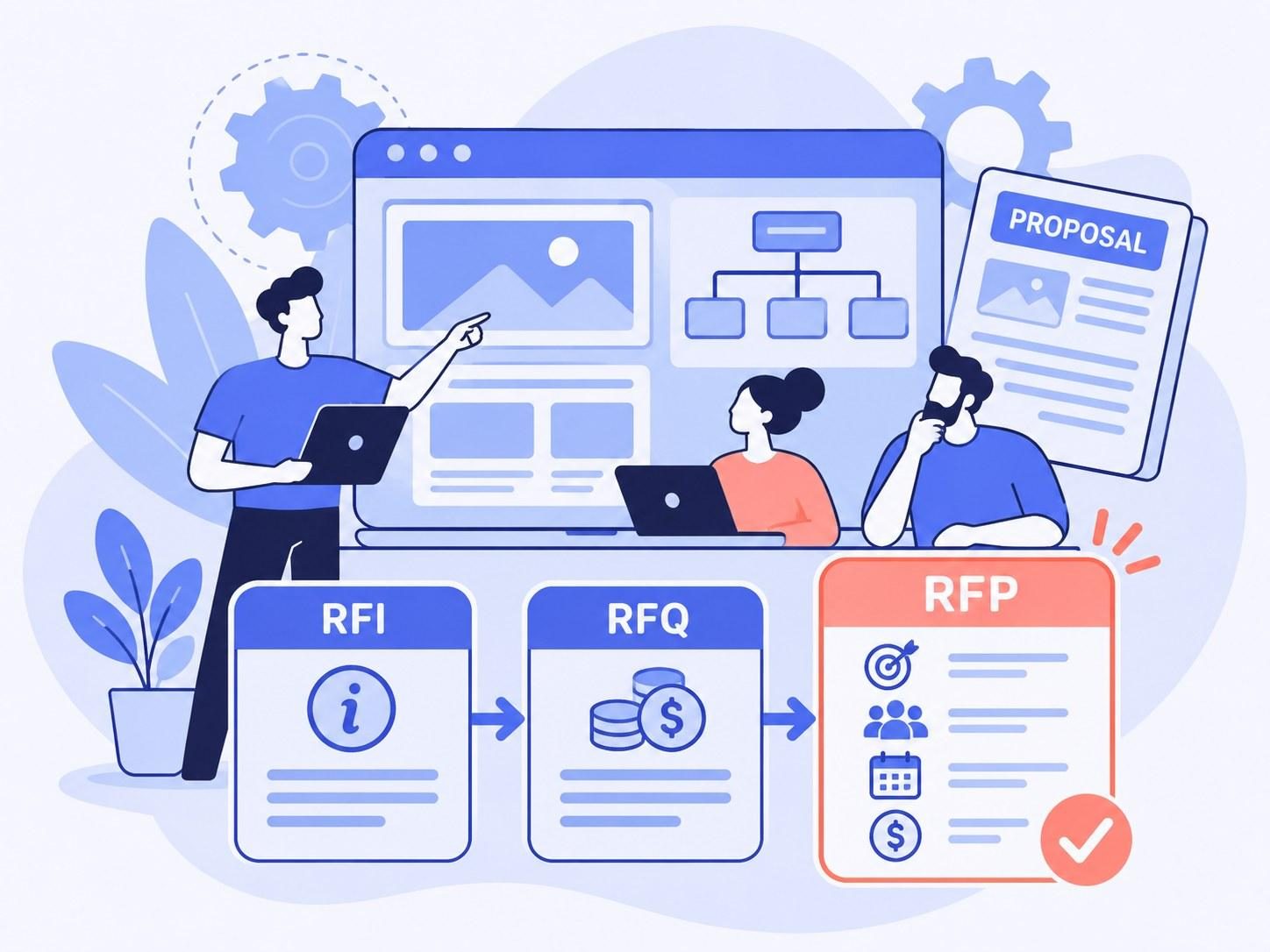
An RFP is one of three common procurement documents:
- RFI (request for information) collects general information about vendors before you have defined the project.
- RFQ (request for quote) asks for a price on work that is already fully specified.
- RFP (request for proposal) asks vendors to propose an approach, team, timeline, and price for a project with defined goals.
For a website, an RFP is usually the right choice. You want agencies to suggest how to reach your goals as well as price the work. If you are buying custom software rather than a website, our guide to software development RFPs covers the sections that type of project needs.
When to write an RFP and when a short brief is enough
A formal RFP is worth the effort when:
- you plan to compare several agencies;
- the budget needs approval from management or a board;
- your organization has procurement rules, for example in the public sector, universities, or nonprofits;
- the site has integrations, several user groups, or content in more than one language.
If you are talking to one or two agencies about a small site, a one-page brief is enough. Even then, the sections below will make the first call shorter and the quotes more accurate.
What to include in a website RFP
An RFP for website design and development usually covers ten sections. You can use them as the headings of your document.
1. Organization background and project overview
Explain who you are, what you sell, and who your customers are, then give a short project overview: what you want to build and why now. Add the URL of your current website and name two or three competitors or sites you like, with a sentence on what you like about each. This gives agencies context that a feature list cannot.
2. Project goals and how you will measure them
State what the new website should change for the business: more qualified leads, more online bookings, fewer support calls, a site your team can update without a developer. Where you can, add the current numbers. A goal with a baseline tells the agency what the project is for and lets you check the result after launch.
3. Target audience
Describe the main user groups and what each comes to do on the site. A clinic, for example, may have new patients looking for a dentist nearby and existing patients who need to reschedule. Agencies plan the structure and the user flows around these tasks.
4. Scope of work and deliverables
List the services you need and mark what your team will handle in-house. The usual items are:
- discovery and research;
- UX and UI design;
- front-end and back-end development;
- content writing and migration of existing content;
- on-page SEO and analytics setup;
- training for your team and support after launch.
Scope has a direct effect on price. If one agency includes content and another does not, their quotes describe different projects.
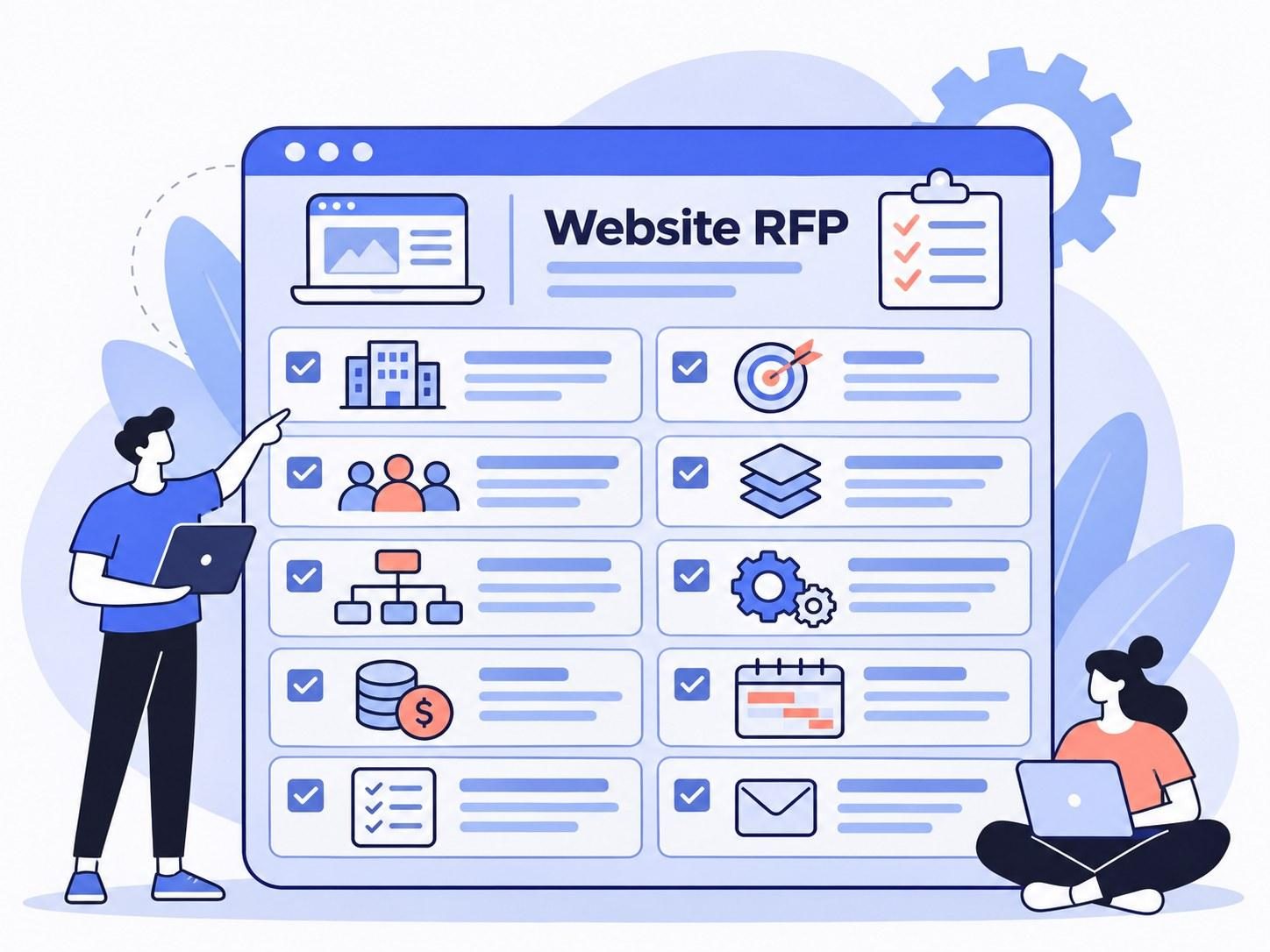
5. Sitemap and content
Give the main sections of the site, the page types (product pages, case studies, blog, landing pages), and the approximate number of pages. Say who will write new copy and how much existing content will move to the new site.
6. Technical requirements
Technical project requirements prevent surprises after the contract is signed. Cover:
- Content management: a CMS you already use or prefer, or a note that you are open to suggestions.
- Integrations: CRM, payment system, booking tool, ERP, marketing automation.
- Hosting: whether you have hosting or expect the agency to provide it.
- Accessibility: the standard you must meet, for example WCAG 2.1 AA.
- Security and privacy: data you collect, consent requirements, and any industry rules.
7. Budget range
Include a budget range, even if it is approximate. Without it, agencies propose solutions of very different size, and you cannot compare them. A range also tells agencies early whether the project fits them. If you do not know what is realistic, our article on website development cost explains the factors that drive the price.
8. Timeline
List the key dates of the RFP process: the deadline for questions, the proposal deadline, the decision date, the planned start, and the launch date. If the launch is tied to an event or a campaign, say so. Agencies plan the team around these dates, and a fixed deadline changes the approach.
9. Proposal requirements and selection criteria
Tell agencies what each proposal must include: approach, team, timeline, cost breakdown, two or three relevant case studies, and support terms. Then explain how you will score the proposals, for example by approach, relevant experience, cost, and timeline. Agencies write better proposals when they know what matters to you.
10. Contact details and submission rules
Name one contact person and say how agencies should send questions and proposals. If you share answers to questions with every participant, mention that. Add any NDA or legal requirements here.
What to add to a website redesign RFP
A website redesign RFP needs everything above, plus information about the site you already have:
- Current performance: traffic, conversions, and top pages from Google Analytics and Google Search Console.
- Known problems: what users and your team complain about, and what already works and should stay.
- SEO requirements: pages and URLs that bring traffic, and the expectation that the agency plans redirects. Our website redesign SEO checklist lists what to protect.
- Content inventory: which pages stay, which change, and which go.
- Brand assets: logo files, brand guidelines, photos, and fonts you hold licenses for.
If you are not sure which problems the redesign has to solve, review the current site before you write the RFP. Our guide on UX audit vs website redesign explains when an audit answers that question.

Website RFP template
Copy this website RFP template into a document and replace the prompts in brackets. It works for a new site and for a redesign. If you only need design, the same structure works as a website design RFP template: remove the development items from the scope. A website development RFP for a site that is already designed can drop the design items instead.
| [Company name] Website RFP |
|---|
|
1. About us [Who we are, what we sell, and who our customers are. Current website: [URL].] |
|
2. Project goals [What the new website must achieve, with current numbers and targets.] |
|
3. Target audience [Main user groups and what each comes to do on the site.] |
|
4. Scope of work [Services we need: discovery, UX/UI design, development, content, SEO, migration, training, support. Work our team will do in-house.] |
|
5. Sitemap and content [Main sections, page types, approximate number of pages, and who provides the content.] |
|
6. Technical requirements [CMS, integrations, hosting, accessibility standard, security and privacy requirements.] |
|
7. Current website (for redesigns) [Traffic and conversion data, known problems, pages and URLs that must be kept.] |
|
8. Budget [Budget range, and whether it includes hosting, licenses, and support.] |
|
9. Timeline [Questions due: [date]. Proposals due: [date]. Decision: [date]. Target launch: [date] and the reason for it.] |
|
10. Proposal requirements [Approach, team, timeline, cost breakdown, two or three relevant case studies, support terms.] |
|
11. Selection criteria [How proposals will be scored, for example: approach, relevant experience, cost, timeline.] |
|
12. Contact and submission [Contact person, email, proposal format, and how questions will be answered.] |
Website RFP example
Website RFP examples help most when you see the sections filled in for a real situation. Here is a short example for a fictional dental group.
- About us: Northfield Dental Group runs four clinics in Ohio. Patients book by phone or through a form on our current WordPress site.
- Goals: grow online bookings from about 40 to 80 per month within six months of launch, and reduce calls about opening hours and services.
- Audience: new patients looking for a dentist nearby, mostly on mobile, and existing patients who need to reschedule.
- Scope: UX/UI design, development, migration of about 30 existing pages, integration with our booking system, and on-page SEO. We will write the new copy in-house.
- Technical requirements: a CMS our front-desk staff can edit without a developer, WCAG 2.1 AA, and a booking integration that works on mobile.
- Budget: a fixed range approved by management for design and development. Hosting and support are quoted separately.
- Timeline: proposals due in three weeks, decision a week later, launch before our spring campaign.
Each line answers a question an agency would otherwise ask on the first call. That is the test for every section of your RFP.
Common mistakes in website RFPs
- Features without goals. A list of pages and plugins leaves agencies guessing what the site is for.
- No budget. Agencies have to guess the size of the project, and the proposals you get are impossible to compare.
- A fixed price on an open scope. If the content, integrations, or page count are unknown, ask for a price range or a paid discovery phase first.
- No time for questions. Good agencies ask questions before they price the work. A tight deadline with no Q&A gets you rushed estimates.
- An unedited template. Sections that do not apply to your project make the RFP longer and harder to answer.
- Too many recipients. Send the RFP to a short list of agencies whose portfolios match your project. You need time to read every proposal properly.

How to compare website proposals
When the proposals arrive, put them in one table and compare them on the same points:
- Goals: does the proposal explain how the agency will reach your goals, or does it only repeat your requirements?
- Scope: check line by line what is included. Content, SEO, migration, training, and support are easy to miss.
- Team and process: who will work on the project, how often you will see progress, and how changes are handled.
- Experience: case studies of similar projects, with results.
- Cost: a breakdown by phase, and what happens to the price if the scope changes.
A price far below the others often means a smaller scope. Ask the agency what is excluded before you decide. For the follow-up calls, use our list of 20 questions to ask a web design company.
Frequently asked questions
What is an RFP for a website?
It is a document that describes your website project, including goals, scope, requirements, budget, and timeline, and asks agencies to send proposals in a set format so you can compare them.
What is the difference between an RFP and an RFQ?
An RFP asks vendors to propose how they would do the project and at what price. An RFQ asks only for a price on work that is already fully defined. Website projects usually need an RFP, because the approach matters as much as the price.
Should I include a budget in a website RFP?
Yes. A budget range lets agencies propose a solution that fits it, and lets you compare proposals of similar size. If you are unsure, give the range you would be ready to approve.
Do I need separate RFPs for web design and web development?
Usually not. One web design RFP that covers design and development lets a single team plan both, and you avoid gaps between two vendors. Write a separate web development RFP only if the design is already done and you need a team to build it.
How long should a website RFP be?
Long enough to answer the questions an agency needs to price the work, and short enough to read in one sitting. Ten clear sections are better than a long document full of generic requirements.
Send us your website RFP
Admiral Studios designs and develops websites for businesses. If you have an RFP ready, or a rough brief you want to discuss, send it to our team through the web design or web development page.
Contents
Back to the top